
How it works
How Untimer works.
Untimer has one timer, the hourglass, one session length, and one set of four. This page walks through a session and the screens around it.
Beginning
Press and hold the glass. Let go at the stop.
Press the glass and hold it. The spring engages after a moment and winds for two and a half seconds, clicking as it goes. At the stop you feel a catch. Let go and the session begins.
If you let go early, it unwinds and nothing starts.
Every session is twenty five minutes. On the keyboard, hold Enter or Space and release at the stop. If you use switch access, voice control or a screen reader, there is an action after the glass that winds it for you.
During
While it runs.
Reset
Puts the session back to its full length without ending it. The same session, the same task, and the interruptions you noticed are all still there. Nothing is counted, because nothing finished.
Interruption
One tap records that something pulled you away, from inside or outside, and one line says what it was. The box at the top of the screen hands it back when you come back. The note that meets you
Stop
Ends the session. The glass goes back to rest and the app says nothing about it, because a session you stopped counts for nothing. It stays on your record and in your export. Stopping early is showing up
The tab title shows the minutes left, and so does the navigation when you are on another screen. When the sand runs out it sounds, with the tab in the background too. Beside the time, a small figure like 2/4 says which session of the set this is.
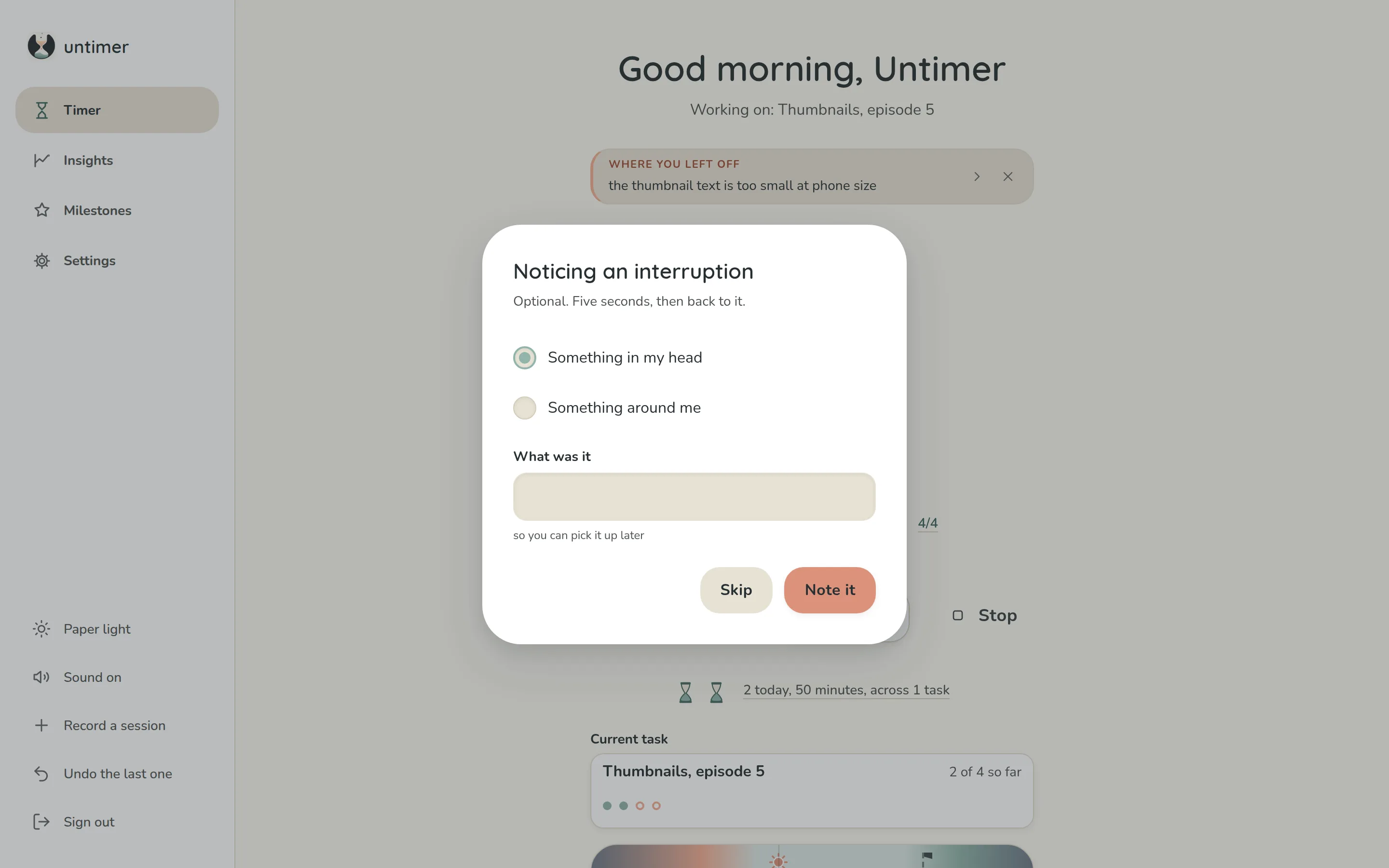
A task
Say what it is for, if you want to.
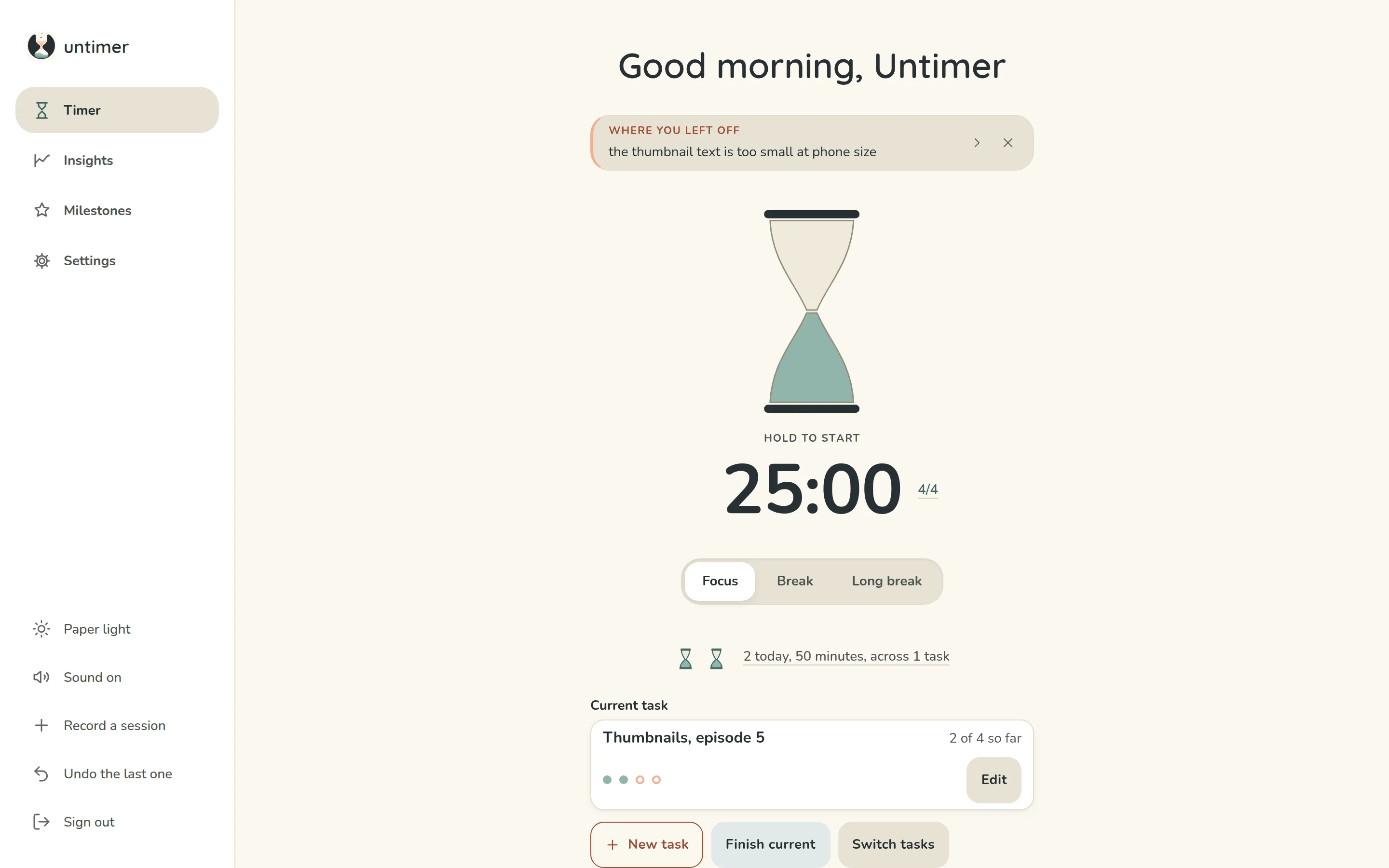
Under the day's count is the task you are on, as a card: the name, and what has gone into it against what you said it would take, drawn as dots. A task is never required, and the empty card says so.
New task asks for a name and how many sessions you think it will take, and nothing is made without both. Finish current keeps it on today's list, marked finished, until the day is over. Switch tasks is the whole list, and the three you were on most recently sit under the buttons.
From the next day a finished task lives in Insights, which lists what you finished against what you said. Going past your guess is drawn plainly, after a hairline, and is never marked against you.
Ending
When it ends.
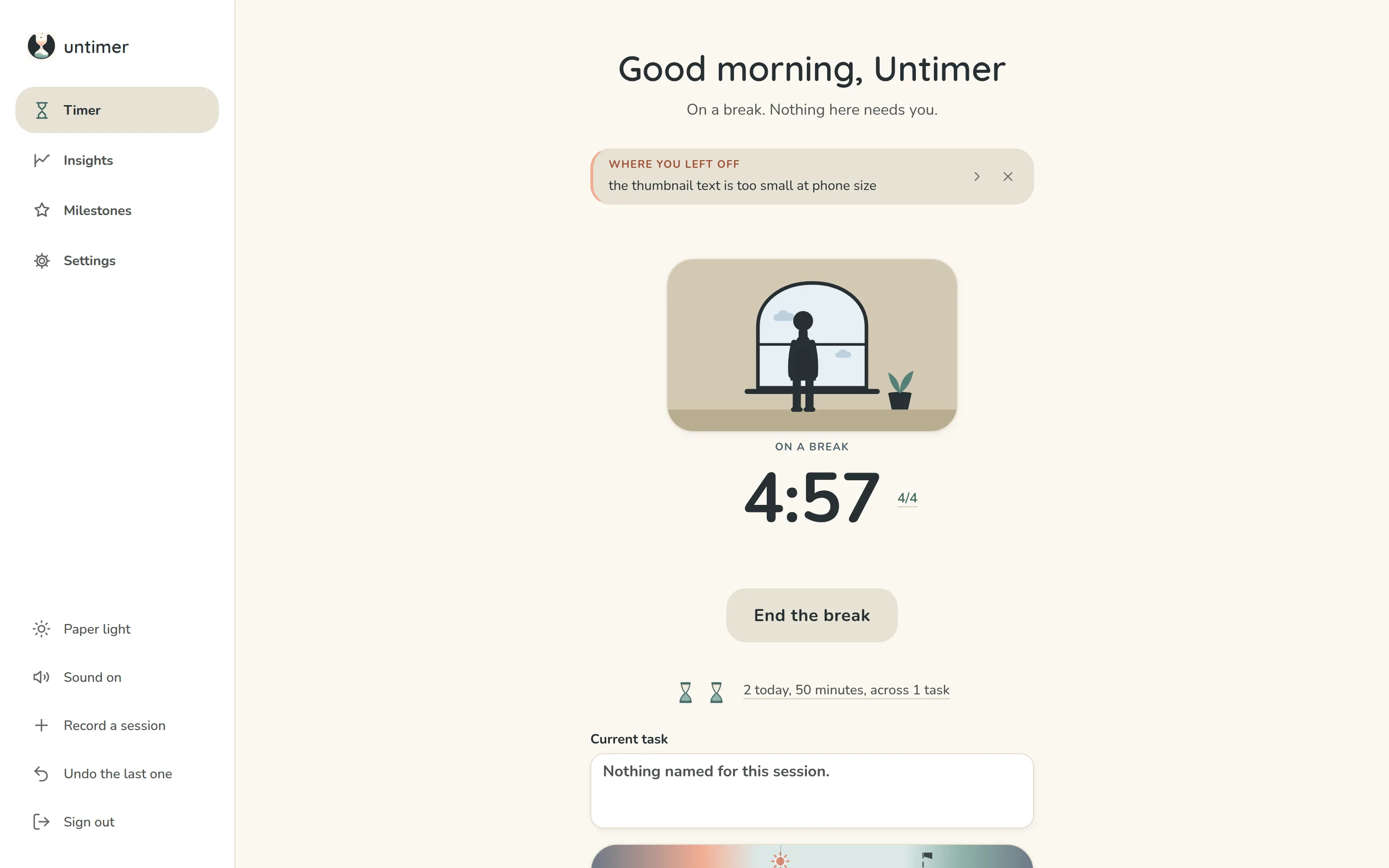
When a session runs its length the screen does not change. The glass is replaced by a scene to look at, the selector moves to Break, and the box under the heading says what happened and names any milestone you reached.
Start the break when you are ready, or press Focus and go straight back to the glass. Nothing starts by itself.
A session you stopped is different. The glass goes back to rest, the box keeps the line it was holding, and no break is offered, because there is nothing to rest from. The session is still on your record and still in your export.
After four completed sessions you get a long break. The figure beside the time, 4/4 by then, is where you are in the set. Press it and it explains itself, and lets you put the count right if it has drifted.
The box holds one thing at a time, in this order: what just happened, then where you left off, then a tip about the timer, a line worth reading or a fact about your own day. The arrow shows the next one. The cross puts away what can be put away.
The box, one thing at a time
The screens
Timer, insights, milestones and settings.
Timer
One screen that stays where it is. The box that says one thing at a time, the glass or a scene to look at while you rest, the time with the set figure beside it, today's count drawn as one small hourglass per session, the task you are on as a card with what has gone into it against what you said, and today drawn as a day with your sessions standing on it at the times they happened.
Insights
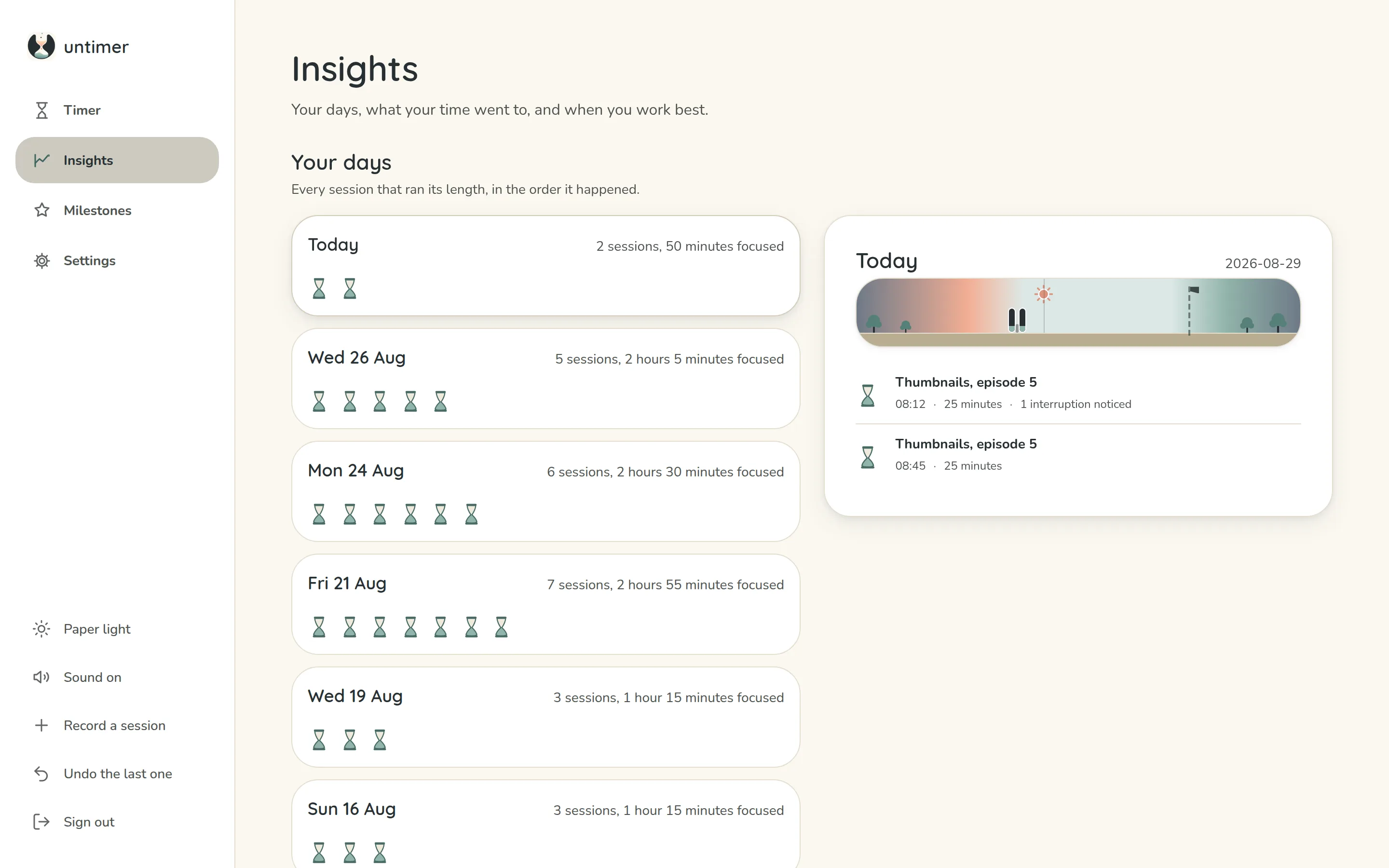
Your days first, one small hourglass per session, and how often you come back, both free. Then, with Plus, what your time went to, the hours and weekdays you work most, your record so far, your best, when your days run, what pulled at you, and a year at a glance. What each panel shows.
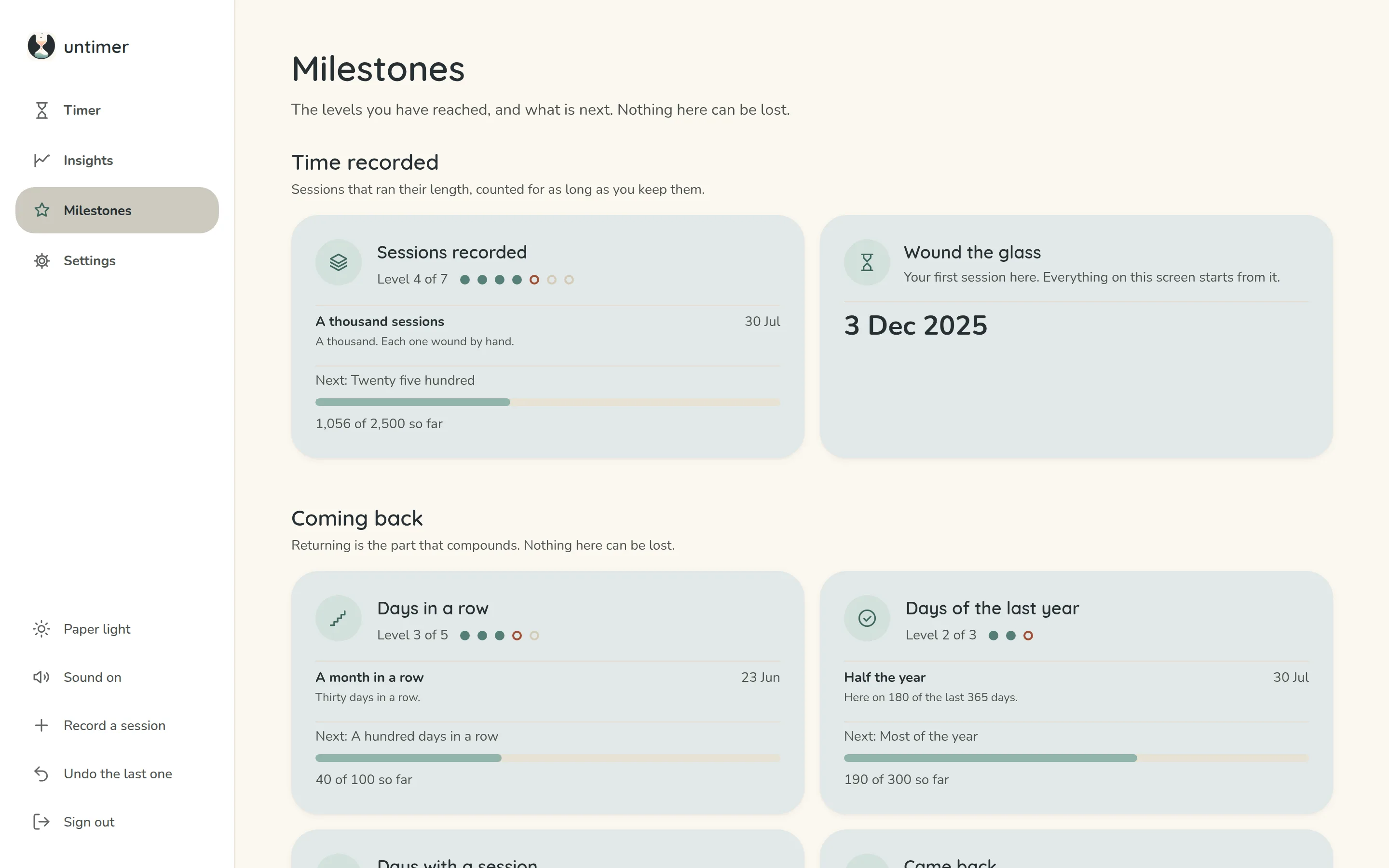
Milestones
Ladders with levels, in four groups. Each one shows the level you reached and what is next, and you keep every one of them. Some marks are not listed until they happen.
Settings
The end of your working day, and nothing about the timer: its four lengths are fixed. Below that, a system notice for the one moment the bell cannot ring, a line about your other devices, and your account, where you can download your data or delete it.
While you work
What Untimer does that a timer usually does not.
- The countdown sits in the tab title.The sand moves, the tab counts down in minutes, and the navigation carries the time left onto every screen. You can be looking at something else and still know.
- One line records what pulled you away.You write it at the moment you leave, and the box at the top of the timer hands it back when you return, so coming back does not start with working out where you were.
- Twenty five minutes, four to a set, fixed.There is no length to choose and no schedule to build, so there is nothing to arrange instead of starting.
- Nothing here scores you.There are no streaks and no failure screens, and a day you missed looks like any other day, so coming back after a bad week costs you nothing.
Fixed and yours
What is fixed, and what you can change.
| Fixed | Why |
|---|---|
| A session is 25 minutes | Every session is the same length, so there is nothing to decide before you start. More |
| A set is 4 sessions | Then a long break. You can correct where you are in the set. |
| A break is 5 minutes, a long break 25 | End the break stops either one the moment you have had enough, and counts nothing against you. |
| The hourglass | Peach sand is the time ahead, sage is the time spent. At rest it has run out. |
| Winding | You hold the glass for two and a half seconds, which turns it over, and letting go starts the session. |
| Yours | Choices |
|---|---|
| An end to the working day | Off by default. Any time you choose. |
| Theme | Paper light, or a warm dark |
| Sound | On, or muted, from the rail |
| A notice at zero | Off until you allow it. Shown only where the bell could not ring. |
That is all of it.
There are no projects, calendars or integrations. A timer, and a record of what you did.
Register for freeThe timer and your days are free. Plus is $1.99 a month or $19 a year for the rest of Insights and the whole ladder.